Best Stock Footage Sites for 4K Cinematic Video

High-quality visuals are essential for creating professional and engaging video content. Whether you are producing YouTube videos, advertisements, documentaries, or cinematic short films, using 4K stock footage can dramatically improve the visual appeal of your project. Stock footage platforms provide creators with access to professionally shot clips that would otherwise be expensive or difficult to capture.

In this guide, we explore some of the best stock footage sites for 4K cinematic video and how they can help elevate your creative projects.

Why Use 4K Cinematic Stock Footage

4K resolution has become the industry standard for modern video production. It offers sharper details, better color depth, and greater flexibility during editing. Cinematic stock footage is typically shot with professional cameras, stabilized equipment, and carefully planned lighting, making it ideal for professional productions.

Using stock footage allows creators to save time and production costs. Instead of traveling to multiple locations or filming complex scenes, editors can simply license high-quality clips and integrate them seamlessly into their projects. This is especially valuable for filmmakers, marketers, and content creators working with limited budgets.

iStock Video

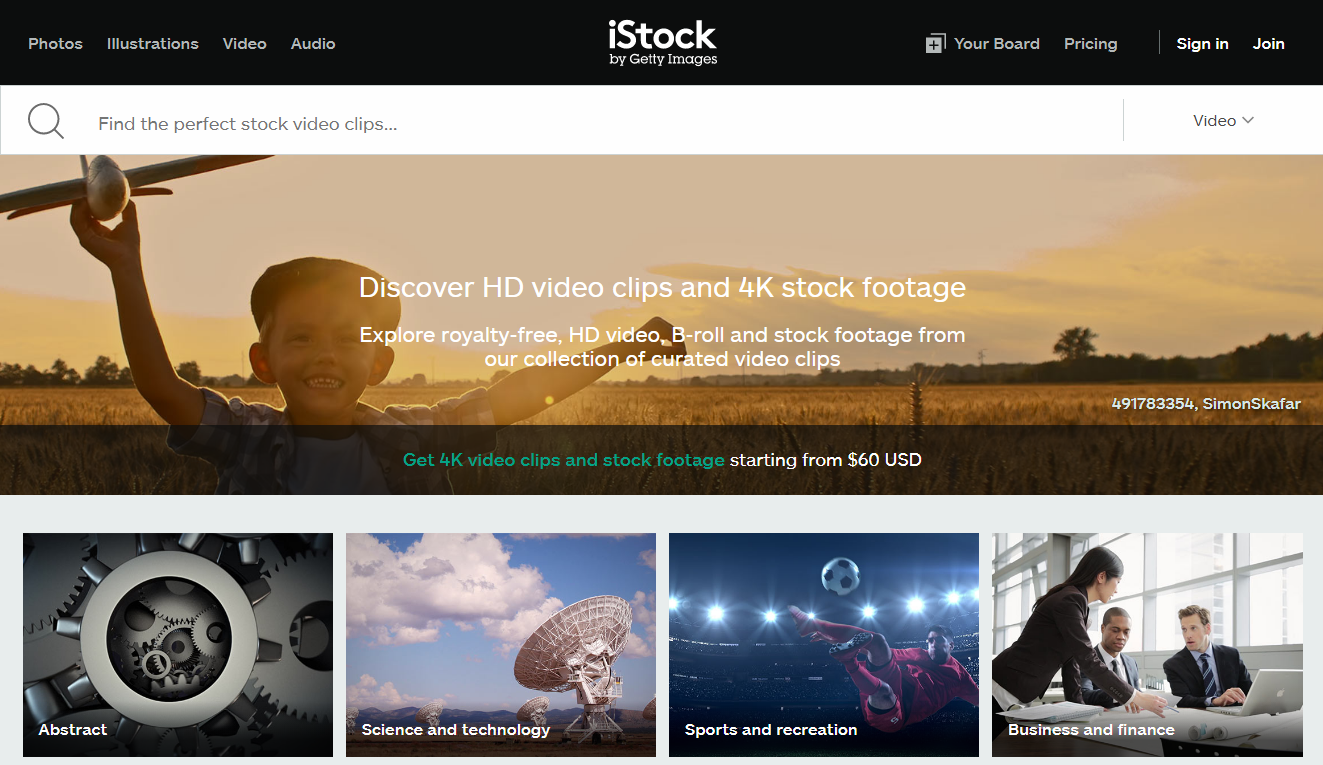
One of the most reliable platforms for cinematic footage is iStock Video. It offers a large collection of professionally curated clips in 4K resolution, covering everything from aerial landscapes and city skylines to business environments and lifestyle scenes.

The platform is known for its strong quality control, ensuring that every clip meets professional production standards. Creators appreciate the intuitive search system, which allows users to filter results by resolution, frame rate, orientation, and style. With iStock Video, filmmakers can quickly find cinematic clips that match the mood and tone of their projects.

Another advantage is the flexible licensing system, which allows creators to use footage for commercial and creative projects with clear usage rights.

Shutterstock

Shutterstock is another popular stock footage provider with an extensive 4K library. It features millions of clips from filmmakers around the world, making it easy to find unique cinematic visuals for nearly any project.

The platform includes advanced search tools that allow users to filter by duration, category, camera movement, and color palette. This helps editors locate clips that blend seamlessly with existing footage. Shutterstock is particularly popular among advertisers and digital marketers who need polished visuals for promotional videos.

Adobe Stock

Adobe Stock is a strong option for video editors who work within the Adobe Creative Cloud ecosystem. Its stock footage library integrates directly with editing software, allowing creators to preview and license clips without leaving their editing environment.

The platform includes a growing selection of cinematic 4K footage ranging from dramatic landscapes to professional lifestyle scenes. For editors who prioritize workflow efficiency, Adobe Stock offers a seamless way to incorporate high-quality visuals into their projects.

Pexels and Pixabay

For creators working with limited budgets, free stock footage platforms like Pexels and Pixabay are excellent alternatives. Both sites provide a collection of free video clips, including some 4K footage suitable for cinematic projects.

While the libraries are smaller compared to premium platforms, they still offer valuable resources for YouTube creators, social media marketers, and beginner filmmakers. Many clips are released under permissive licenses that allow commercial use without attribution.

Choosing the Right Stock Footage Platform

The best stock footage site ultimately depends on your project requirements. Premium platforms typically offer larger libraries, higher production quality, and more reliable licensing options. Free platforms can still be useful for smaller projects or when experimenting with video editing.

When selecting stock footage, it is important to consider factors such as resolution, camera style, color grading, and licensing terms. Choosing the right clips will ensure your final video maintains a consistent cinematic look.

Final Thoughts

4K cinematic stock footage has become an essential tool for modern content creators. From filmmakers and marketers to social media creators, high-quality stock clips allow professionals to produce visually compelling videos without the cost of large productions.

Platforms such as iStock Video, Shutterstock, Adobe Stock, and several free alternatives provide access to stunning cinematic visuals that can transform an ordinary video into a professional production. By choosing the right stock footage source, creators can enhance storytelling, improve production value, and deliver visually engaging content to their audiences.

Videoblocks Free Trial: Get 5 Free Downloads of Premium Stock Videos & Templates

Looking for high-quality stock footage without breaking the bank? We’ve discovered a game-changing solution that’ll transform your video content creation. Videoblocks offers a comprehensive free trial that lets you explore their vast library of professional-grade video assets.

We’ll walk you through everything you need to know about Videoblocks’ free trial period, including how to make the most of your access to their extensive collection of HD and 4K video clips, After Effects templates, and motion backgrounds. Whether you’re a content creator, filmmaker, or marketing professional, this trial gives you a risk-free opportunity to evaluate if Videoblocks is the right fit for your creative needs.

Key Takeaways

  • Videoblocks offers a comprehensive 7-day free trial with 5 download credits, providing access to over 1 million professional-grade video assets
  • The platform includes HD and 4K footage, After Effects templates, motion backgrounds, royalty-free music, and sound effects – all available during the trial period
  • Signing up requires basic account information and payment details (though no charges during trial), with a simple 5-minute registration process
  • Free trial users get unlimited preview access, full-resolution downloads, search filters, and the ability to create collections and save favorites
  • After the trial, subscribers can choose between monthly ($39/month) or annual plans ($29/month billed annually), both including commercial licensing rights

What Is Videoblocks And Its Features

Videoblocks operates as a subscription-based digital media platform offering unlimited downloads of royalty-free video assets. The Videoblocks free trial unlocks access to a comprehensive library of professional-grade content for creative projects.

Stock Video Library Overview

The platform houses over 1 million HD and 4K video clips spanning diverse categories:

  • Aerial footage captured by professional drone operators
  • Green screen backgrounds for video editing projects
  • Time-lapse sequences of cityscapes natural phenomena
  • Motion graphics templates for Adobe After Effects
  • Business presentations animated elements
  • Lifestyle footage featuring diverse demographics
Video Content Type Available Assets
HD Clips 800,000+
4K Footage 200,000+
After Effects 100,000+
Motion Backgrounds 50,000+
  • Royalty-free background music tracks for commercial use
  • Sound effects libraries covering ambient nature tech effects
  • Loop-ready audio clips for seamless transitions
  • Voice-over friendly instrumental tracks
  • Genre-specific music including corporate cinematic electronic
Audio Content Type Available Tracks
Music Tracks 100,000+
Sound Effects 50,000+
Audio Loops 25,000+

Understanding The Free Trial Offer

Videoblocks offers a comprehensive 7-day free trial that grants unrestricted access to its extensive media library. The trial provides an authentic experience of the full platform’s capabilities without requiring any upfront payment.

Trial Duration And Limitations

The Videoblocks free trial runs for 7 consecutive days from the moment of registration. During this period, users receive 5 download credits to explore premium content with these specific features:

  • Unlimited preview access to the entire library
  • Full-resolution downloads of up to 5 assets
  • Access to the platform’s search filters & organization tools
  • Ability to create collections & save favorites

Available Content During Trial Period

The trial unlocks complete access to Videoblocks’ diverse media categories including:

  • HD & 4K stock footage clips
  • Motion graphics templates
  • After Effects projects
  • Background videos
  • Green screen footage
  • Professional sound effects
  • Royalty-free music tracks
Content Type Available Items
Video Clips 1+ Million
Music Tracks 100,000+
Sound Effects 50,000+
Motion Graphics 25,000+

Each downloaded asset during the trial includes the same commercial licensing rights as paid memberships, ensuring creators can use the content in their projects immediately.

How To Sign Up For Videoblocks Free Trial

Signing up for a Videoblocks free trial involves a straightforward process that takes less than 5 minutes to complete. The platform provides immediate access to its extensive library upon successful registration.

Registration Process

  1. Visit the official Videoblocks website
  2. Click the “Start Free Trial” button in the top navigation
  3. Enter your email address in the designated field
  4. Create a secure password with at least 8 characters
  5. Select your preferred subscription plan
  6. Check the terms of service box
  7. Click “Continue” to proceed to payment details
  1. Valid credit card or PayPal account information
  2. Billing address matching your payment method
  3. Contact phone number for account verification
  4. Name as it appears on the payment method
  5. Country of residence for regional pricing
  6. ZIP/Postal code for location verification

Note: While payment information is required to start the free trial, no charges apply during the 7-day trial period. Users retain full control to cancel before the trial ends with no obligations.

The registration system automatically validates all entered information to ensure a smooth transition into accessing the Videoblocks library of HD footage, motion graphics templates, and audio assets.

Making The Most Of Your Trial Period

The Videoblocks free trial provides 7 days of unlimited access to explore premium content assets. Here’s how to maximize your trial experience and evaluate the platform’s capabilities effectively.

Downloading And Testing Content

During the trial period, users receive 5 download credits to test full-resolution assets. Here’s how to utilize these credits:

  • Download diverse content types (HD footage, motion graphics, audio tracks) to test quality across formats
  • Test downloaded assets in editing software to verify compatibility
  • Apply different search filters to find specific content styles
  • Create sample projects using trial downloads to assess workflow integration
  • Export test clips to evaluate resolution quality across devices
  • Create custom collections to organize potential assets for future projects
  • Test advanced search filters for specific resolutions, durations, or categories
  • Preview unlimited assets in watermarked format before using download credits
  • Access curated playlists of themed content for quick browsing
  • Experiment with the audio library featuring music tracks and sound effects
  • Save favorites to streamline content organization
  • Try template customization tools for motion graphics
Trial Feature Limit/Availability
Download Credits 5 downloads
Preview Access Unlimited
Collection Creation Unlimited
Search Filters Full Access
Audio Library Full Access
Template Tools Full Access

Pricing And Subscription Options After Trial

Videoblocks offers flexible subscription plans after the free trial period ends. The pricing structure includes both individual and enterprise options with varying levels of access to their extensive media library.

Monthly vs Annual Plans

The standard individual subscription comes in two formats:

  • Monthly Plan: $39/month with unlimited downloads
  • Annual Plan: $29/month (billed annually at $348) offering a 25% savings
    Both plans include:
  • Unlimited access to HD & 4K stock footage
  • Complete music library access
  • Motion graphics templates
  • Commercial licensing rights
  • 5 monthly premium downloads
  • Multi-seat licensing for 3+ team members
  • Custom download limits
  • Dedicated account management
  • API access for workflow integration
  • Enhanced collaboration tools
  • Priority technical support
  • Custom pricing based on team size
Plan Type Monthly Cost Annual Cost Premium Downloads
Standard Monthly $39 $468 5/month
Standard Annual $29 $348 5/month
Enterprise Custom Custom Negotiable

Conclusion

We believe Videoblocks’ free trial represents an excellent opportunity to explore professional-grade video resources without financial commitment. The platform’s extensive library combined with 5 download credits lets creators test the waters before making a long-term investment.

We recommend taking advantage of this risk-free period to determine if Videoblocks aligns with your creative workflow. Whether you’re a filmmaker content creator or marketing professional the trial provides ample time to evaluate the platform’s vast collection of assets and user-friendly features.

The straightforward signup process and flexible cancellation policy make it easy to start your journey into high-quality stock footage today.


Do You Need a License to Sell Art? Ultimate Guide for Artists

As an artist myself, I know the thrill of wanting to share your creations with the world and make some money doing it! But before diving into selling your masterpieces, it’s important to understand the legal requirements that come with turning your passion into a business.

I’ve discovered that if you’re making more than $400 annually from your art sales, you’ll need proper licensing to operate legally. While it might seem overwhelming at first, getting the right permits isn’t just about following rules – it’s about protecting your creative work and opening doors to exciting opportunities like wholesale purchasing and tax benefits! Plus, having the proper documentation lets you operate under a business name of your choice and positions you for potential grants and professional opportunities.

Understanding Art Business Licensing Requirements

Art licensing regulations protect both artists and consumers while ensuring tax compliance and legal business operations.

When You Need a Business License

Selling art requires a business license when annual sales exceed $400. Here’s what triggers the licensing requirement:

  • Operating under a business name different from your legal name
  • Selling art directly to customers at markets, fairs or online platforms
  • Accepting commissions or custom artwork orders
  • Receiving art-related grants or funding
  • Making wholesale purchases for art supplies

State and Local Regulations

Each jurisdiction maintains specific licensing requirements for art sales:

  • City licenses apply to sales within city limits
  • County permits cover unincorporated areas
  • State regulations vary based on sales volume and business structure
License Type Renewal Period Typical Requirements
City License Annual Business address verification
County Permit Annual Sales tax registration
State License 1-2 years Tax ID number

The specific requirements depend on:

  • Sales volume and frequency
  • Business location
  • Type of artwork sold
  • Sales channels used
  • Revenue generated

Licensing offers important benefits:

  • Access to wholesale pricing
  • Legal protection for artwork
  • Ability to collect sales tax
  • Eligibility for business grants
  • Professional credibility

I’m excited to note that online art marketplaces now provide integrated tools for managing licenses and sales tax compliance, making it easier than ever to operate legally.

Legal Structures for Artists

Artists operating a business have three primary legal structures to choose from, each with distinct advantages for creative professionals. Let’s explore the most common options and their tax implications.

Sole Proprietorship vs LLC

A sole proprietorship represents the simplest business structure for artists selling their work. Under this arrangement, I operate as a single owner with complete control over my creative business decisions. While LLCs offer additional legal protection by separating personal assets from business liabilities, they involve more complex setup procedures than sole proprietorships.

Business Structure Setup Complexity Legal Protection Cost to Form
Sole Proprietorship Low Limited $0-$100
LLC Medium Strong $100-$800

Tax Obligations

Tax responsibilities vary based on the chosen business structure. As a sole proprietor, I report all income directly on my personal tax return using Schedule C. The income flows through to my personal finances, making recordkeeping straightforward. With an LLC, I maintain separate business accounting records while enjoying greater flexibility in tax treatment options.

Tax Consideration Sole Proprietorship LLC
Tax Forms Schedule C Schedule C or Form 1065
Self-Employment Tax Yes Yes
Income Reporting Personal Return Business Return Option

Ways to Sell Your Art

Art sales channels create diverse opportunities for artists to monetize their work, regardless of licensing status. Here are proven methods to reach potential buyers through established platforms and direct sales approaches.

Online Marketplaces

  • Etsy facilitates sales of original art pieces digital downloads prints through a user-friendly interface
  • FineArtAmerica specializes in fine art sales connecting artists with collectors seeking premium pieces
  • Society6 enables artists to sell artwork on various products from prints to home decor items
  • Creative Market focuses on digital art sales including graphics templates patterns
  • Amazon Handmade provides access to millions of buyers seeking unique handcrafted artwork
  • Redbubble Zazzle offer print-on-demand services placing artwork on merchandise
Platform Primary Art Types Commission Rate
Etsy Original + Digital 5% + $0.20/listing
Society6 Print-on-demand 10% on products
FineArtAmerica Fine Art 30% on sales
Creative Market Digital designs 40% commission
  • Personal website sales maximize profit margins by eliminating platform fees
  • Social media platforms Instagram Facebook Marketplace enable direct customer connections
  • Commission-based work offers customized pieces based on client specifications
  • Freelance platforms Fiverr Upwork connect artists with clients seeking custom artwork
  • Local art fairs galleries provide opportunities for in-person sales connections
  • Custom commissions through word-of-mouth referrals build repeat clientele

Protecting Your Art Business

Protecting my art business involves establishing essential safeguards for my creative work. I’ve discovered several critical areas that require attention to ensure my art business operates securely.

Copyright Considerations

Copyright protection automatically applies to my original artwork from the moment of creation. I retain exclusive rights to reproduce, distribute, display my work or create derivative pieces. These rights persist even after I sell the physical artwork. Can I sell my art without a license, registering my copyright with the U.S. Copyright Office provides additional legal protection if infringement occurs.

Insurance and Liability

Art insurance protects my work against damage, theft or loss during storage, transit or display. I maintain coverage based on:

Insurance Type Coverage Details
Studio Insurance Protects artwork, supplies, equipment in workspace
Transit Insurance Covers pieces during shipping or transportation
Exhibition Insurance Safeguards work displayed at galleries or shows
Liability Coverage Protects against third-party claims

I’ve learned to document my artwork through:

  • Taking high-resolution photos
  • Maintaining detailed inventory records
  • Creating certificates of authenticity
  • Keeping receipts for materials
  • Recording appraisals for valuable pieces

Each documentation method provides essential proof of ownership and value for insurance claims.

Setting Up Your Art Business

Setting up an art business requires strategic planning to establish successful pricing, payment methods and shipping processes. Even without a license, you can begin preparing these essential business elements.

Pricing Your Artwork

Artwork pricing combines material costs, labor time and market positioning. Here’s a systematic approach to pricing:

  • Calculate direct costs (materials, framing, packaging)
  • Track production hours at a fair hourly rate
  • Research comparable artwork prices in your market
  • Add 50% markup for gallery/marketplace commissions
  • Consider size-based pricing tiers (small: $50-200, medium: $200-500, large: $500+)
  • Factor in shipping costs if offering free shipping

Payment and Shipping Policies

Clear payment and shipping policies build trust with customers:

Payment Options:

  • Accept major credit cards through secure processors
  • Offer PayPal or digital payment systems
  • Consider payment plans for higher-priced pieces
  • Set deposit requirements for commissioned work

Shipping Guidelines:

  • Package artwork with protective materials
  • Use tracking on all shipments
  • Insure valuable pieces during transit
  • Set flat-rate shipping zones
  • Define international shipping terms
  • Establish handling time expectations

My pricing and policies focus on protecting both the artwork and customer satisfaction. While you can begin selling art without a license when earning under $400 annually, establishing professional business practices positions you for growth when licensing becomes necessary.

Note: All sales must comply with applicable tax regulations regardless of licensing status.

Conclusion

I’m thrilled to see how many amazing opportunities exist for artists to share their work with the world! While selling art without a license is possible when you’re just starting out it’s super important to understand when you need to take that next step into becoming officially licensed.

I’ve found that getting the right permits and licenses isn’t just about following rules – it’s about opening doors to fantastic opportunities like wholesale deals grants and professional credibility. Plus with so many online platforms making it easier than ever to manage the business side of art there’s never been a better time to turn your passion into a thriving business!

Remember your creative journey is unique and exciting. Whether you’re just beginning or ready to scale up make sure you protect your work and set yourself up for success!


iStock Video: Your Ultimate Guide to Professional Stock Footage & Licensing Options

In today’s digital landscape, finding high-quality video content is crucial for creating compelling marketing campaigns, social media posts, and presentations. That’s where iStock Video comes in – a leading platform that offers millions of professionally produced stock footage clips for creators worldwide.

We’ve explored iStock’s extensive video library and discovered why it’s become a go-to resource for businesses, marketers, and content creators. From breathtaking aerial shots to intimate lifestyle moments, iStock Video provides diverse footage options that can elevate any project. With flexible licensing options and competitive pricing, it’s no wonder why many professionals trust this platform for their video content needs.

Key Takeaways

  • iStock Video is a premium marketplace offering over 14 million royalty-free video clips, part of Getty Images’ ecosystem, providing broadcast-quality footage in SD, HD, and 4K formats.
  • The platform offers flexible payment options through pay-as-you-go credits (starting at $12) or subscription plans (ranging from $169-$399/month), with various licensing terms for different usage rights.
  • Videos are available in multiple formats (MOV, MP4, WMV) and resolutions up to 4K, with frame rates from 24-60fps, ensuring compatibility with major editing software.
  • Advanced search features include AI-powered filtering options for technical specifications, content themes, and shot types, making it easy to find specific footage.
  • While iStock Video offers professional-quality content and comprehensive features, users should consider the complex credit system, premium pricing, and download limits when choosing this platform.

What Is iStock Video?

iStock Video is a premium digital marketplace that offers over 14 million high-quality, royalty-free video clips from professional videographers worldwide. It’s part of Getty Images’ extensive media ecosystem, providing broadcast-quality footage in various formats including 4K HD.

The platform features:

  • Diverse Categories: News footage, aerial shots, lifestyle scenes, nature sequences
  • Multiple Resolutions: SD, HD, 4K footage options for different project requirements
  • Flexible Downloads: Credit-based system or subscription plans for regular users
  • Format Compatibility: MOV, MP4, WMV file types for various editing software

iStock Video maintains strict quality standards through a rigorous vetting process that ensures:

  • Professional Production Value: Cinema-grade equipment usage in footage creation
  • Technical Excellence: Proper exposure, focus, stability in all clips
  • Legal Compliance: Model releases, property releases, copyright clearance
  • Metadata Organization: Accurate tags, descriptions, categories for easy search

The platform integrates seamlessly with popular video editing software, enabling direct imports from the iStock plugin. Each video includes embedded licensing information, streamlining the documentation process for commercial projects.

Video Quality Maximum Resolution Frame Rate Options
SD 720×480 24, 25, 30 fps
HD 1920×1080 24, 25, 30 fps
4K 3840×2160 24, 25, 30 fps

Key Features of iStock Video

iStock Video’s platform combines professional-grade features with user-friendly functionality. Here’s a detailed look at the essential features that set iStock Video apart from other stock footage platforms.

Video Quality and Resolution Options

iStock Video delivers broadcast-quality footage in multiple resolution formats. The platform offers SD (480p), HD (1080p) up to 4K Ultra HD (2160p) resolutions encoded with H.264 compression. Every clip includes preview options to evaluate quality before purchase with frame rates ranging from 24fps to 60fps for smooth motion capture.

Flexible Licensing Terms

The platform provides two distinct licensing options: Standard and Extended licenses. Standard licenses cover most common uses including websites social media broadcast. Extended licenses include additional rights for merchandise unlimited print runs large-scale broadcasts. The credit-based system enables single purchases while subscription plans offer volume discounts for regular content needs.

Search and Filter Capabilities

iStock Video’s advanced search interface streamlines content discovery through precise filtering options:

  • Technical filters: Resolution frame rate aspect ratio duration
  • Content filters: Categories themes moods colors locations
  • Shot type filters: Aerial footage time-lapse slow motion drone shots
  • Customizable sorting: Best match newest downloads popularity

Each video includes detailed metadata tags advanced preview options smart recommendations. The platform’s AI-powered search understands contextual queries suggesting relevant alternatives based on visual similarity creative concepts.

Pricing Plans and Subscription Options

iStock Video offers flexible payment options through credits or subscription packages to accommodate different content needs and budgets. The platform features transparent pricing with no hidden fees or complicated terms.

Pay-As-You-Go Credits

Credits on iStock Video function as digital currency for individual video downloads. Here’s how the credit system works:

  • Purchase credits in bundles: 1 credit ($12), 5 credits ($48), 10 credits ($90)
  • HD videos require 6-12 credits per download
  • 4K videos require 18-24 credits per download
  • Credits remain valid for 12 months from purchase date
  • Bulk credit purchases unlock volume discounts up to 20%

Subscription Package Details

iStock Video subscriptions provide cost-effective solutions for regular content needs:

Essential Video Subscription

Duration Monthly Downloads Monthly Price Annual Price
Monthly 10 HD videos $199 –
Annual 10 HD videos $169 $2,028
Duration Monthly Downloads Monthly Price Annual Price
Monthly 25 HD videos $399 –
Annual 25 HD videos $339 $4,068
  • Automatic monthly download renewal
  • Access to premium video content library
  • Download rollover for unused credits (up to 3 months)
  • Option to upgrade or downgrade plans anytime
  • HD quality downloads included
  • 4K downloads available for additional credits

Using iStock Video for Projects

iStock Video integrates seamlessly into professional workflows with straightforward downloading processes and comprehensive usage rights. The platform’s compatibility with industry-standard editing software streamlines video production for creators and businesses.

Downloading and Usage Rights

iStock Video provides immediate access to purchased content through a simple download interface. Each video comes with clear usage rights documentation embedded in the metadata, specifying permitted uses under Standard or Extended licenses. The platform offers:

  • Direct downloads in multiple resolutions including SD HD 4K
  • Perpetual worldwide rights for commercial use
  • Instant download access after purchase confirmation
  • Clear documentation of usage terms in downloadable certificates

Video Editing Compatibility

iStock Video delivers files optimized for professional editing software compatibility. The platform supports:

  • Direct imports into Adobe Premiere Pro through dedicated plugins
  • Compatible file formats including MOV MP4 WMV
  • Frame rates matching broadcast standards (23.98 24 25 29.97 30 fps)
  • Native resolution preservation during import
  • Metadata retention across editing platforms
  • Alpha channel support for effects footage

Each video maintains its original quality through the editing process with embedded timecode information for precise timeline placement. The clips feature professional codec compatibility ensuring smooth playback in major editing applications.

Pros and Cons of iStock Video

iStock Video offers distinct advantages and limitations for content creators seeking professional stock footage. Let’s examine the key benefits and drawbacks of this platform.

Advantages for Content Creators

  • Extensive Library Access: Browse through 14+ million professionally vetted video clips in multiple resolutions including 4K HD
  • Flexible Licensing Options: Choose between credit-based purchases or subscription plans with clear usage rights documentation
  • Professional Quality: Access broadcast-ready footage with consistent technical standards across the library
  • Advanced Search Features: Filter content by specific technical requirements, themes or shot types using AI-powered search tools
  • Software Integration: Import videos directly into editing software like Adobe Premiere Pro through dedicated plugins
  • Multiple Format Support: Download files in MOV, MP4 or WMV formats with preserved metadata
  • Resolution Options: Select from SD, HD or 4K versions of the same clip based on project needs
  • Credit System Complexity: Navigate a tiered credit system where HD videos require 6-12 credits and 4K footage needs 18-24 credits
  • Premium Pricing: Pay higher rates compared to some competitors, particularly for 4K content
  • Download Limits: Face restrictions on daily downloads with subscription plans
  • Storage Requirements: Manage large file sizes, especially with 4K footage downloads
  • Internet Speed Dependency: Download high-resolution files with stable high-speed internet connection
  • Format Restrictions: Work within available format options without raw footage alternatives
  • Credit Expiration: Use purchased credits within a specified timeframe to avoid expiration

Alternative Stock Video Platforms

Several competitive platforms offer unique features distinct from iStock Video’s offerings:

Shutterstock

  • Houses over 28 million royalty-free video clips
  • Offers flexible subscription plans with daily download limits
  • Provides HD 4K footage with simple licensing terms
  • Includes direct plugin integration with Adobe Premiere Pro
  • Features AI-powered search capabilities

VideoBlocks by Storyblocks

  • Provides unlimited downloads with annual subscription
  • Offers a 7-day free trial for new users
  • Features a growing library of 1+ million assets
  • Includes After Effects templates
  • Maintains consistent pricing without credit systems

Pond5

  • Contains 23+ million video clips
  • Features exclusive archival footage collections
  • Provides variable pricing based on resolution quality
  • Offers individual clip purchases without subscription requirements
  • Includes aerial footage drone shots

Adobe Stock

  • Integrates seamlessly with Creative Cloud applications
  • Features 20+ million high-quality video assets
  • Provides template-based motion graphics
  • Offers HD 4K footage with perpetual licenses
  • Includes AI-powered visual search capabilities
  • Specializes in cinematic quality footage
  • Provides unlimited downloads with subscription
  • Features story-driven video collections
  • Offers raw footage options
  • Includes commercial licensing for all videos

Each platform caters to specific needs:

Platform Video Library Size 4K Support Subscription Options
Shutterstock 28M+ Yes Monthly/Annual
VideoBlocks 1M+ Yes Annual Only
Pond5 23M+ Yes Pay-per-clip
Adobe Stock 20M+ Yes Monthly/Annual
Artgrid 500K+ Yes Annual Only

These alternatives offer varying content libraries price points resolutions enabling creators to select platforms matching their specific project requirements.

Conclusion

We’ve explored the comprehensive features and capabilities that make iStock Video a powerful resource for content creators. With its vast library professional-grade footage flexible licensing options and seamless workflow integration it stands as a valuable platform for businesses and creators alike.

While there are some considerations regarding pricing and technical requirements the platform’s commitment to quality and user-friendly features makes it a worthwhile investment. Whether you’re creating marketing content social media posts or professional presentations iStock Video delivers the tools and resources needed to bring your vision to life.


Create High-Quality Projects with Premium Beat

Are you looking for a new alternative to traditional stock music? Premium Beat offers audio tracks on steroids. It boasts an exclusive music library, curated by experts to complement your audio and video projects. High quality and continuously evolving, the stock site also features a streamlined music licensing model to make it easier for you to acquire the usage you need.

Here are the best features of the stock audio site that can blow you away:

  • Highly searchable library. At PremiumBeat, incredible music awaits. You can explore its exclusive, royalty-free music through a very functional search bar. Search, sort, and filter by genres, mood, BPM, duration, artists, and instruments. Find your perfect match with over 15,000 premium sound in the library.
  • Keyboard shortcuts. Yes, the stock music site allows you to use keyboard shortcuts to enhance your browsing experience. Use the left/right to search backward or forward and up/down to play the next and previous song. Use the C button to check out and play/pause your favorite song with the spacebar.
  • Organized collections. Premium Beat has a very organized library that helps you find the music tracks you need easily and quickly. You can search the most popular music or the most recently added tracks in the website. You can also search by genre with Jazz or Classical music. Moreover, you can directly find royalty-free content for your projects.
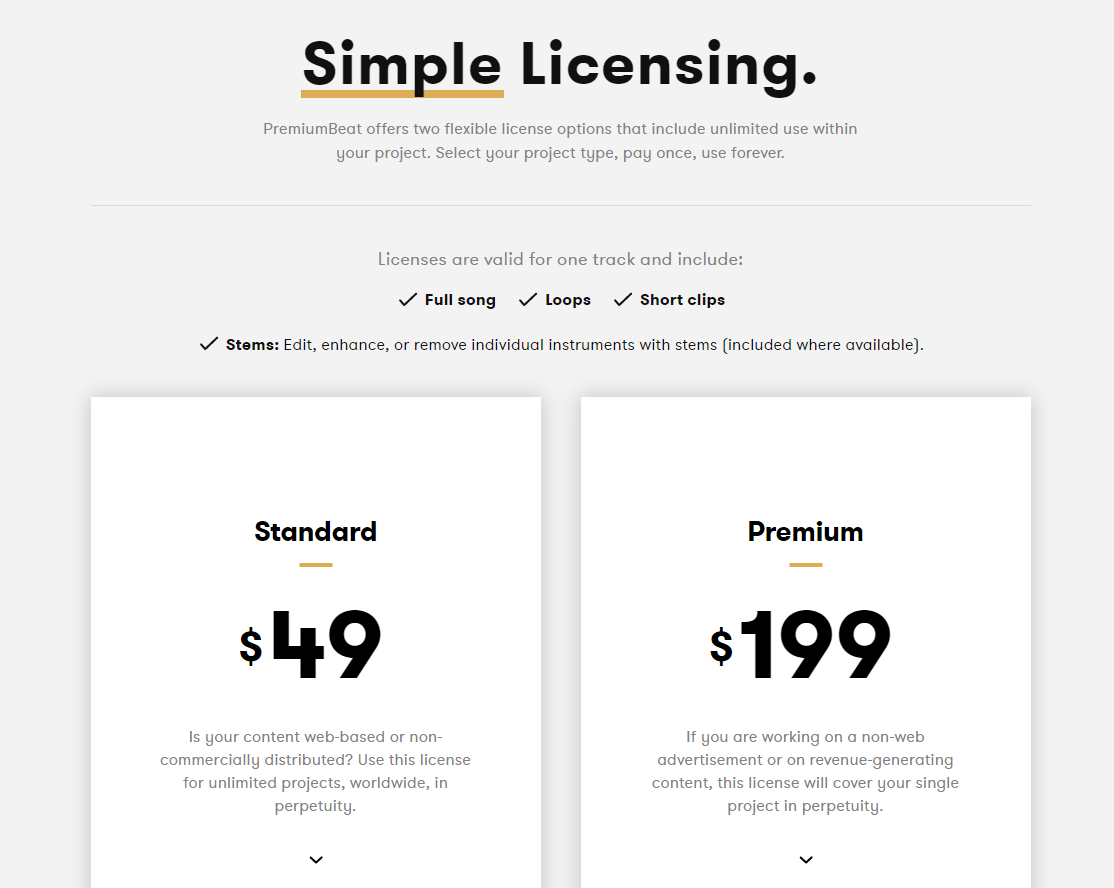
  • Simple licensing. The stock site prides itself with simple licensing that includes unlimited use within your audio and video projects. Licenses are valid for one music track and include the full song, loops, and short audio clips. To start, select your project type, pay once, and use forever.

Comparison of Royalty-Free Licenses in PremiumBeat
If you are not sure what license you should get, take a look at this brief comparison of the Standard and Premium Licenses.

STANDARD LICENSE

A standard license allows you to use the audio track and sound for unlimited projects around the world, in perpetuity. It also allows you to use the music files on your website and distribute them non-commercially. However, you are not allowed to add them in advertising, tradeshows, displays, and showrooms. Visit here!

PREMIUM LICENSE

A premium license is perfect for projects that involve non-web advertisement and revenue-generating content. It covers your single venture in perpetuity and allows unlimited use on apps and games. You can also use the audio tracks in pilots and public broadcasting. Moreover, you can use them on national TV and radio, and in industrial and point-of-sale.

Both licenses allow you to use the music tracks in web and corporate, including YouTube, Vimeo, podcasts, and social media. You can also incorporate them into free apps and games. Furthermore, you can use them for film and theatrical of students and festivals.

Creating high-quality creative projects involves more than just your skills and talent. You also need the right music source to help you turn your ideas into reality. Premium Beat offers exclusive audio that sets you apart from your competition. They also feature plans and pricing that fits your creative needs and budget. If you are still not convinced, check out the detailed review of the music site on Stock Photo Secrets.


What You Can Get with a 7-Day Videoblocks Free Trial

Creative individuals around the world are becoming more informed on the use of stock videos for personal and commercial purposes. Many skip the creative commons and go straight to stock media agencies to download high-quality video clips. They now prefer royalty-free videos over actual free of charge content due to authenticities and value. They are also more aware of the effect of HD stock footage on their creative projects.

Today, the stock video footage market is saturated with various stock media websites. Each agency has something unique to offer to the users, making it difficult to choose a primary resource. If you want high-quality stock video at super affordable prices, you may want to check out Videoblocks and what they have to offer.

About Videoblocks

Videoblocks by Storyblocks is a very innovative stock video website. They started in 2009 and continued to have an active development in the stock footage scene. They pioneered the unlimited downloads subscription, which allows users to download all the stock footage they need for their creative projects. They were also the first to introduce 4K resolution clips in the industry.

The stock video agency features an extensive library of HD, 4K, and 4K+ resolution video clips. You can download all these with a monthly or annual subscription, whichever fits your license needs. In addition to their wholly-owned catalog, Videoblocks also has a dedicated marketplace with millions of royalty-free stock footage files from talented creators.

With thousands of content streaming from contributors around the world, it didn’t take long before Videoblocks ventured to other media types, such as images and audio. They rebranded into Storyblocks and became a multimedia stock agency with content covering trendy and sought-after topics and styles. More info here.

7-Day Videoblocks Free Trial

A Videoblocks free trial is all you need to test the waters. It allows you to access a large pool of content, download video clips in different formats, enjoy discounts in the Marketplace, and get flexible licensing for seven days. It is only available with the smallest subscription plan. But if you sign up, you can get access to a vast library of royalty-free, HD stock footage.

The 7-day free trial also entitles you to the following:

  • 5 video clips from the Member library during the trial
  • 5 stock videos from the Member library after the trial
  • Exclusive Marketplace discounts
  • HD stock footage
  • Standard license with indemnification covering up to $20,000
  • Live customer support
  • Cancellable any time

The perks from Videoblocks by Storyblocks free trial are yours to enjoy by simply filling a form with your complete name, address, and password (for new member account). Then, you can browse through hundreds of thousands of video clips and download 5 free videos to use within a week. Just be sure to cancel your subscription before the trial ends if you don’t want to continue using the stock video site.

If you are new to the stock footage industry, a Videoblocks free trial is also an excellent opportunity to check out what the stock site has to offer. It allows you to see the quality of their content without spending a penny in advance. Videoblocks is undoubtedly a remarkable video source. The fact that you can test it out before paying is a massive advantage for creative professionals like you.

How to Download iStock Video

iStock has been in the industry for over 15 years, providing creative professionals with high quality yet affordable stock files. Aside from the royalty free images that they are so known about, the stock site is also home to some of the most amazing, not to mention exclusive, stock footages in the market. It also boasts an easy to navigate website, which makes buying iStock video is as easy as one-two-three. You don’t have to deal with complicated steps to download the footage you need.

Here’s a quick guide on how to download iStock video:

  • Visit the iStock website. Sign in to your account if you already have one. Otherwise, create a FREE account.
  • Go to the Pricing page. Choose a credit pack size that suits your creative needs and budget. Packages starts at $33 for 3 credits.
  • Proceed with payment. Click “Buy Credits” and fill in the necessary information at checkout. You can choose to pay with your credit card or via PayPal.
  • Use a coupon. Don’t forget to use an iStock coupon if you have one. It will save you a lot for other important expenses both in your future projects and personal endeavors.
  • Surf the collection or use the search engine. Find and download iStock video through the search engine. Filter results by collection or other options to narrow down your choices.
  • Choose the right resolution and license. Then, hit the download button.

That’s it! You can now enjoy your downloaded iStock video. The required amount of credits will be automatically deducted from your account. Your selected clip will go directly to your local storage and will also remain on your account. You can use it in any project as long as you like, as long as it is within the terms and conditions of the stock site.

Choosing Music for Video: 2 Things to Consider

Music plays a very important role in video production. It drives the video forward and creates emotion around your message. However, choosing the right music for video can be a challenging task. You can’t simply choose what sounds great. You need to consider two things to help you pick the perfect song.

  • Emotion
    When people are watching your video, what do you want them to feel? Do you want your target audience to feel warm and fuzzy over testimonials? Or, do you want them to laugh over your candid office scene? There are certain kinds of music that evoke specific types of emotions. You have to find which suits your project best.

 Many music libraries have emotion-based metatags on their tracks, which helps you find a background track that elevates the emotional message of the video. To shop for songs, you can split up your screen, and play your video without sound in one window and the music on the other. This way you can make the perfect match.

  • Looping
    Most pop songs have a pretty standard structure. When you find the right song, the transitions won’t probably jive with your narrative structure. Fortunately, you can loop the music you download. Most stock music agencies provide you with the right to use the track anywhere in your video when you purchase it. You can loop music, so it will fit better into the flow of your video. You can repeat things, cut the bridge, cut the chorus, and more.

Have you found the right background music to work with? If not, we recommend you visit Shutterstock Music. The stock site does not only offer high-quality images and video, but also premium tracks. Browse through the library, and maybe you will find something that will work perfectly in your next video.